Dependent Libraries (Preview)
[This topic is pre-release documentation and is subject to change.]
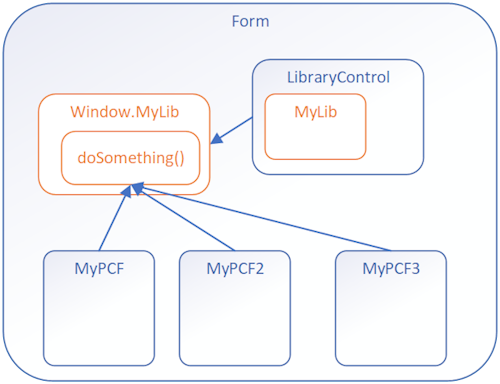
With model-driven apps, you can reuse a prebuilt library contained in another component that is loaded as a dependency to more than one component.
Having copies of a prebuilt library in multiple controls is undesirable. Reusing existing libraries improves performance, especially when the library is large, by reducing the load time for all components that use the library. Library reuse also helps reduce the maintenance overhead in build processes.
Before and After
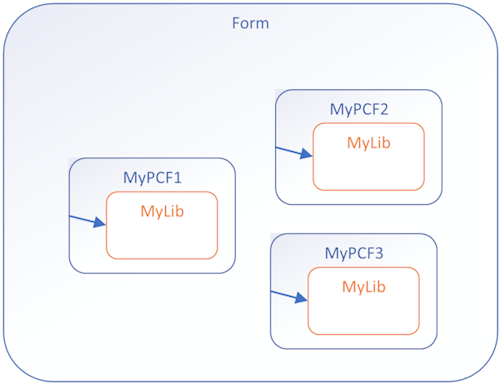
Before: Custom library files contained in each PCF component
After: Components calling a shared function from a Library Control
Implementation Steps
To use dependent libraries, you need to:
- Create a Library component that contains the library. This component can provide some functionality or only be a container for the library.
- Configure another component to depend on the library loaded by the library component.
By default, the library loads when the dependent component loads, but you can configure it to load on demand.
This way you can independently maintain the library in the Library Control and the dependent controls don't need to have a copy of the library bundled with them.
How It Works
You need to add configuration data to your component project so that the build process deploys your libraries the way you want. Set this configuration data by adding or editing the following files:
- featureconfig.json
- webpack.config.js
- Edit the manifest schema to Register dependencies
featureconfig.json
Add this file to override the default feature flags for a component without modifying the files generated in the node_modules folder.
Feature Flags:
| Flag | Description |
|---|
pcfResourceDependency | Enables the component to use a library resource. |
pcfAllowCustomWebpack | Enables the component to use a custom web pack. This feature must be enabled for components that define a library resource. |
By default, these values are off. Set them to on to override the default.
Example 1:
{
  "pcfAllowCustomWebpack": "on"
}
Example 2:
{
   "pcfResourceDependency": "on",
   "pcfAllowCustomWebpack": "off"
}
webpack.config.js
The build process for components uses Webpack to bundle the code and dependencies into a deployable asset. To exclude your libraries from this bundling, add a webpack.config.js file to the project root folder that specifies the alias of the library as externals. Learn more about the Webpack externals configuration option
This file might look like the following when the library alias is myLib:
/* eslint-disable */
"use strict";

module.exports = {
  externals: {
    "myLib": "myLib"
  },
}
Register Dependencies
Use the dependency element within resources of the manifest schema.
<resources>
  <dependency
    type="control"
    name="samples_SampleNS.SampleStubLibraryPCF"
    order="1"
  />
  <code path="index.ts" order="2" />
</resources>
Dependency as On-Demand Load of a Component
Rather than loading the dependent library when a component loads, you can load the dependent library on demand. Loading on demand provides the flexibility for more complex controls to only load dependencies when they're required, especially if the dependent libraries are large.
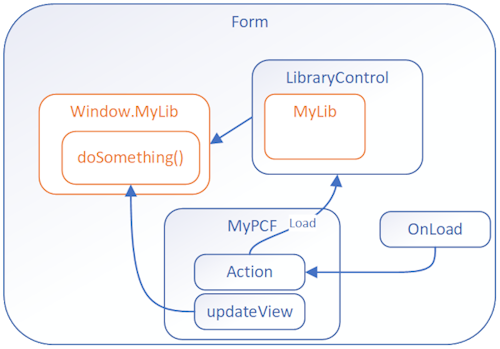
To enable on demand loading, you need to:
Step 1: Add these platform-action element, feature-usage element, and uses-feature element child elements to the control element:
<platform-action action-type="afterPageLoad" />
<feature-usage>
   <uses-feature name="Utility"
      required="true" />
</feature-usage>
Step 2: Set the load-type attribute of the dependency element to onDemand.
<dependency type="control"
      name="samples_SampleNamespace.StubLibrary"
      load-type="onDemand" />
Next Steps
Try a tutorial that walks you through creating a dependent library:
Tutorial: Use dependent libraries in a component